
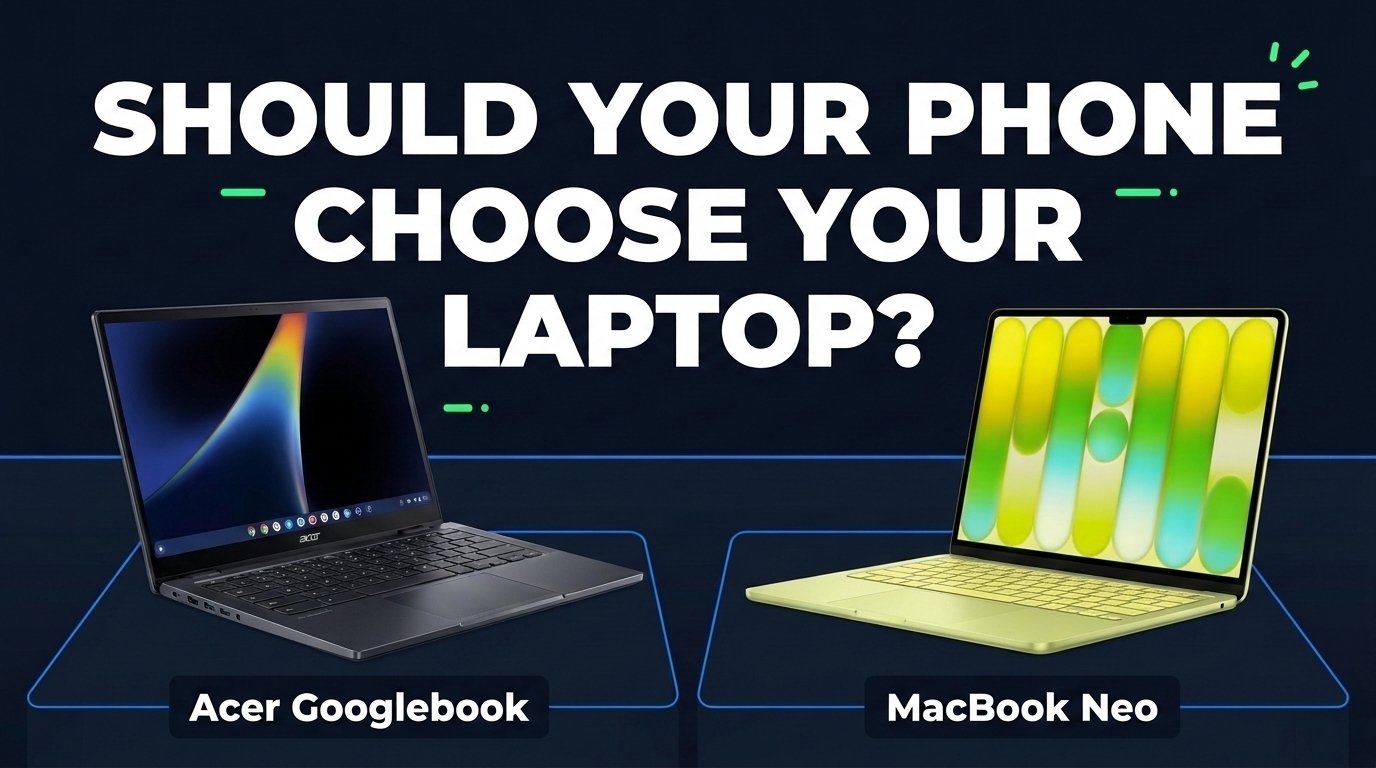
Your phone may already be nudging your next laptop. Before you follow it, check memory, apps and the real price gap.
By Gene B. Geraissati, Founder & Tech Curator | Comparison
If you carry an Android phone, a Googlebook promises to work closely with it. If you carry an iPhone, a Mac feels like the natural next step. That pull is real, but your phone is only one part of the decision. Your essential apps, how much memory you need, the screen you prefer and the total cost matter just as much.
Googlebook is a family of laptops, not a single model, so we picked one representative: the Acer Googlebook 14, the least expensive model in Google’s current lineup at $899. On the other side is Apple’s MacBook Neo, the least expensive MacBook in its lineup. Both are aimed at everyday tasks, schoolwork and light productivity, and they cost about the same, which is exactly why the details matter.
Editorial disclosure: OTN has not tested either laptop. This comparison is based on official specifications and on test results published by Tom’s Guide, Notebookcheck and PC Gamer. US prices were checked on October 10, 2026, before sales tax, and may change. Product images are promotional material from Acer and Apple.


Key takeaways
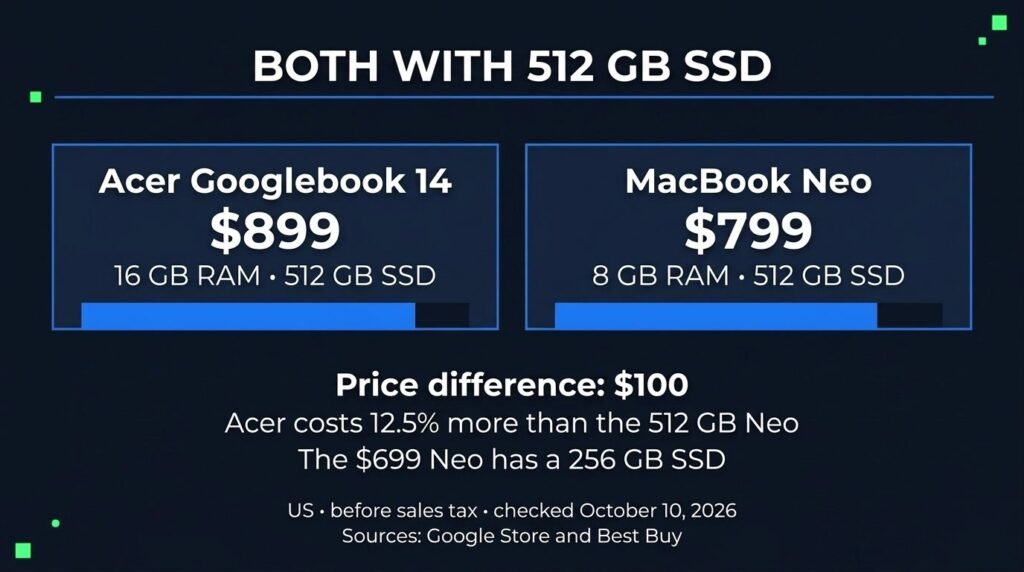
- The headline $200 gap compares different storage sizes. With 512 GB in both, the Acer costs $100 more than the MacBook Neo.
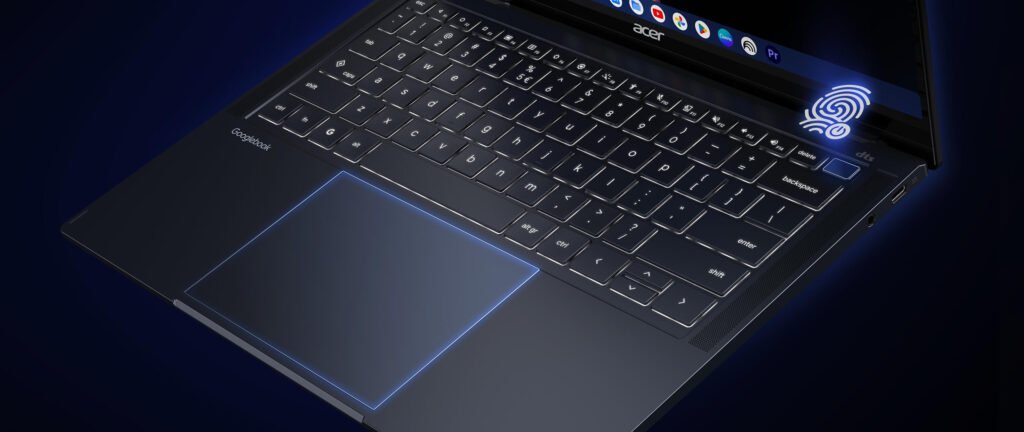
- For that $100, the Acer adds twice the memory (16 GB vs. 8 GB), a touchscreen, a 360-degree hinge and a backlit keyboard.
- Published tests split the result: the Neo leads in single-core performance, the Acer in multi-core. Neither wins every task.
- Android integration is a genuine plus for the Acer, but it requires a compatible phone running Android 17 or later.
- Before comparing scores, check that the apps you rely on work well on the platform you are considering.
Start by matching the storage
The Acer Googlebook 14 sells for $899 with 16 GB of RAM and a 512 GB SSD, according to the Google Store. The MacBook Neo starts at $699 with 8 GB of RAM and a 256 GB SSD, and the 512 GB version costs $799, according to Best Buy’s listings for the 256 GB and 512 GB models.
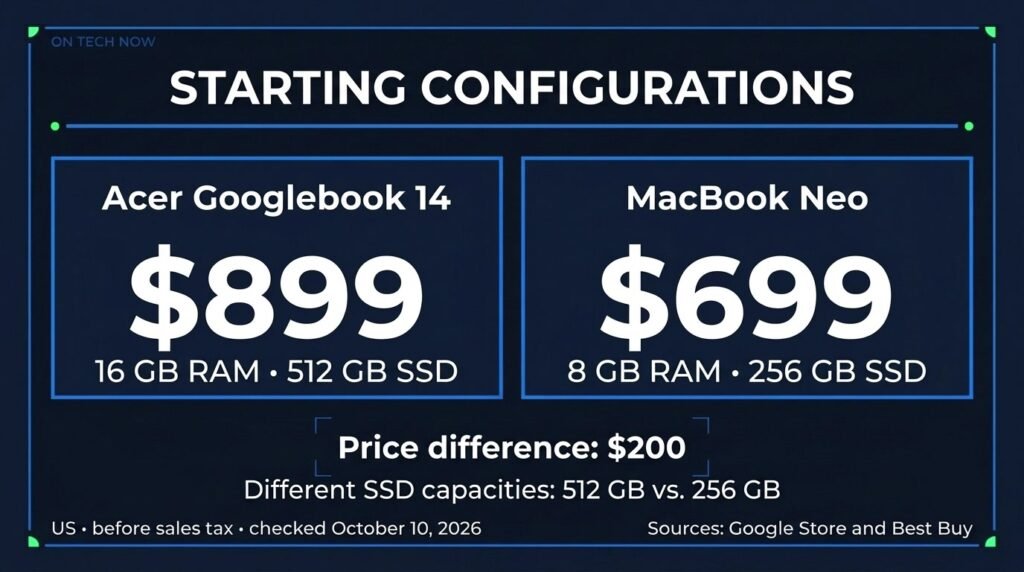
That makes the familiar $200 gap a comparison between different storage capacities. Match the storage and the difference shrinks to $100, which means the Acer costs about 12.5% more than the 512 GB Neo. The 512 GB Neo also adds Touch ID, Apple’s fingerprint sign-in, which the 256 GB model does not have, as listed in Apple’s specifications.
If you read older reviews, you may see lower prices. Apple launched the MacBook Neo at $599 and $699, then raised both configurations by $100 in June 2026, citing a shortage of memory chips, MacRumors reported. Our comparison uses current prices and leaves out education discounts and trade-ins.
Memory is not storage
Think of RAM as your desk and storage as your filing cabinet. Storage holds your files. RAM is the space your apps use while they are open. A bigger desk gives you more room to work, but it does not automatically double your speed.
That extra room matters when you keep a browser full of tabs, a video call and a few documents open at once. The Acer has 16 GB. Both MacBook Neo models have 8 GB, which cannot be upgraded later, according to Notebookcheck. Paying for the 512 GB Neo gives you more room for files, not more working memory.
Displays and tablet mode
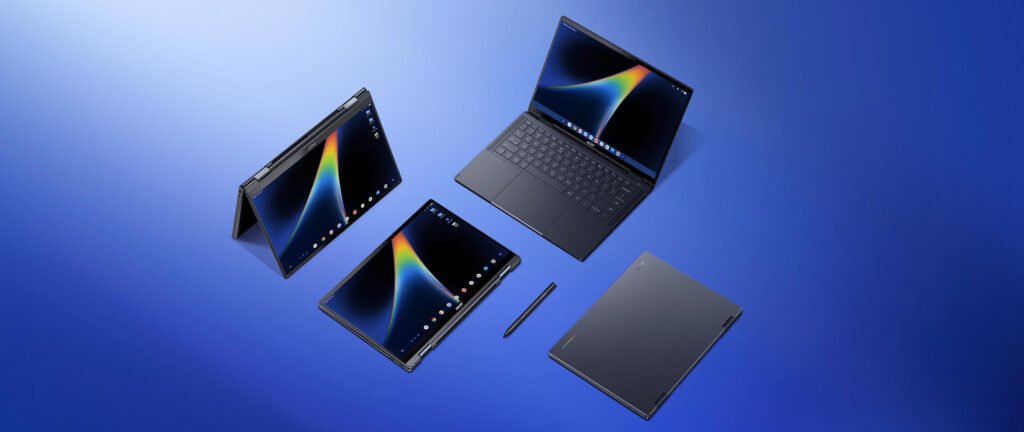
The Acer has a 14-inch OLED touchscreen with a resolution of 2880 × 1800 and a refresh rate of up to 120 Hz. It folds through 360 degrees, so it can also be used in tent and tablet positions, and it supports USI 2.0 styluses, which are sold separately, according to Acer.
The MacBook Neo has a 13-inch IPS display at 2408 × 1506, rated at 500 nits by Apple, and runs at 60 Hz. It is a conventional laptop, without a touchscreen. A higher refresh rate can make scrolling feel smoother, but a 120 Hz screen does not guarantee 120 frames per second in games.
Your apps set the real limit
Before thinking about scores, list the five tasks you do most: a spreadsheet, an editor, a tool your school or employer requires. For each one, check that the version you need exists on the platform, works offline if you need it to, and handles the files you exchange with other people. An app available on two platforms may offer different features on each.
That check matters for Googlebooks with Intel processors, like this Acer. Google told Android Authority that most Android apps run smoothly out of the box, but that a small handful of complex apps or games need developer tuning to run their best on Intel-based models. That is a reason to check your own workflow, not to dismiss the platform. For the Neo, the equivalent question is simpler: does the software you depend on support macOS, and does your workload fit in 8 GB of memory?
What the published tests can tell us
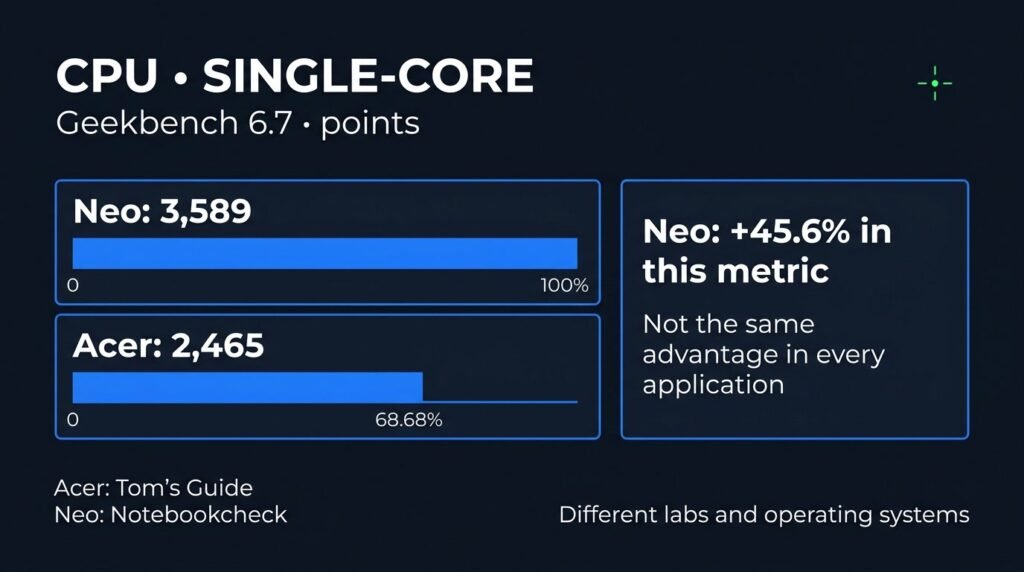
In Geekbench 6.7, a processor benchmark, the MacBook Neo scored 3,589 points in single-core testing, according to Notebookcheck, compared with 2,465 for the Acer in Tom’s Guide’s testing. That puts the Neo about 46% ahead in this measure. It does not mean every everyday task finishes 46% faster.
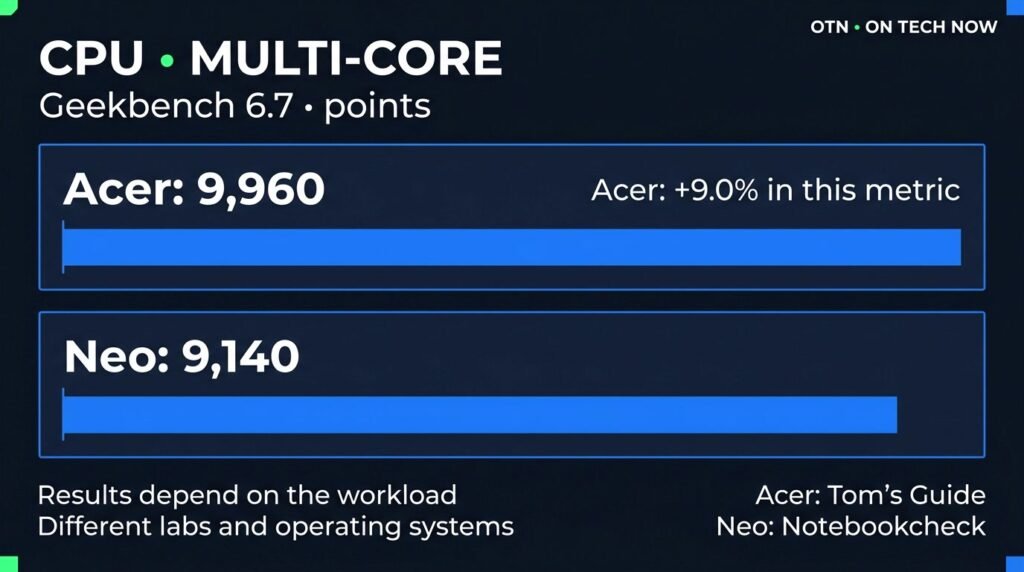
In multi-core testing the order flips: 9,960 for the Acer and 9,140 for the Neo, a lead of about 9% for the Acer. These results come from different labs and different operating systems, so they suggest trends rather than replace testing both machines under the same controlled conditions.
Graphics tell a similar story. In 3DMark’s Wild Life Extreme test, the Acer averaged 24.6 frames per second at Tom’s Guide, while the Neo reached 23.3 at PC Gamer. That small gap is not enough to name a gaming winner or predict how any specific game will run.
For video work, Tom’s Guide found the Neo took 9 minutes and 57 seconds to convert a 12-minute 4K video to 1080p. We did not find an equivalent Acer result, and inventing a head-to-head score would be misleading. If you edit video regularly, test your actual editor and project before buying.
Battery results need the same care. Tom’s Guide measured 13 hours and 28 minutes for the Neo in its web browsing test and 10 hours and 25 minutes for the Acer, both at 150 nits of brightness. The Acer figure is preliminary: Tom’s Guide reported a single run, with the screen at its default 120 Hz, instead of its usual three. We would not promise that same gap in your daily use.
Ports and keyboards
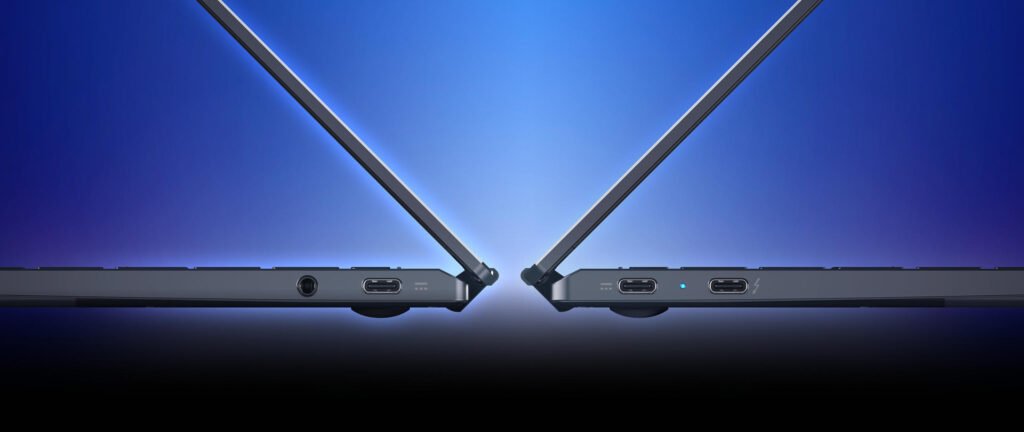
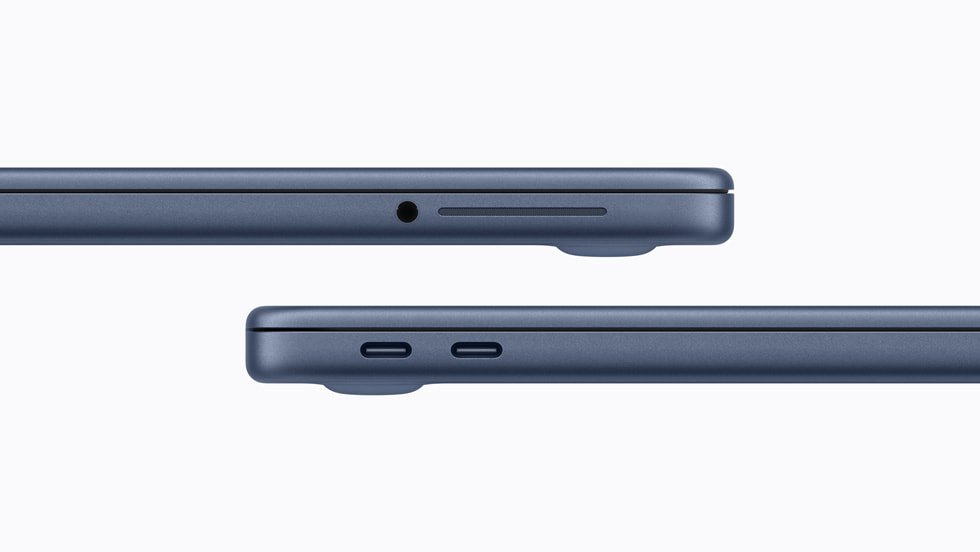
Look at your desk setup too. The Acer has three USB-C ports, one of them with Thunderbolt 4, plus a headphone jack. The MacBook Neo has two USB-C ports that look the same but are not: one handles up to 10 Gb/s and supports an external display, while the other is limited to 480 Mb/s. The Neo supports one external monitor at up to 4K and 60 Hz. For large file transfers, use its faster port.
Another detail: the Acer’s keyboard is backlit, while the Neo’s is not. Notebookcheck called the missing backlight the Neo’s biggest flaw. If you study at night or work in dim rooms, it belongs in your value calculation.

Android or iPhone? Who should consider each
The Acer deserves a look if you value touch, a convertible design and more memory, and your work fits its browser and compatible apps. If you already use Android, Google’s cross-device services can sync notifications, let you continue supported tasks started on your phone, open your phone’s files and apps from the laptop, and share your phone’s internet connection.
Those features come with conditions. Google’s support page lists a compatible phone running Android 17 or later, the latest Googlebook software, the same Google Account on both devices, Bluetooth and Wi-Fi turned on, and a network that allows the devices to find each other; some public or corporate networks block this. Using Android alone does not guarantee every feature, so check your phone before counting it as a buying advantage.
The MacBook Neo makes more sense if you want a lower-cost way into macOS, already use an iPhone, or need software that only runs on a Mac. Our main concern is memory: 8 GB can limit more demanding projects. For heavy editing, specific games or required professional software, start with the project’s requirements. Neither a brand nor a benchmark chart replaces that check.
Total cost goes beyond the price tag
Add the adapters, extra storage and subscriptions you actually need. Free trials expire. Google currently offers limited-time extras with eligible Googlebooks, including a year of Google AI Pro, according to its Googlebook store. A service included for a limited time should not be subtracted from the price as if it were cash. Ask whether you would pay for it anyway, and what it will cost when the promotion ends.
Also count the effort of changing your routine: moving files, learning new software and staying compatible with classmates or colleagues. We do not put invented dollar values on those factors, but they can change the decision.
OTN verdict: let your routine decide, not just your phone
If spending less up front and a preference for macOS come first, the MacBook Neo makes a clear case, especially the $699 model for lighter use. With storage matched, the Acer’s extra $100 buys twice the memory, a touchscreen, a convertible design and a backlit keyboard, which is real value if you will use them.
Your phone can tip the balance. If you use a compatible Android phone, continuing tasks and reaching your phone’s apps and files from a Googlebook adds practical value. If your life runs on an iPhone, the Neo fits more naturally. Either way, check your apps first.
Your phone can point the way, but your apps, your memory needs and the total cost should make the final call.
Watch: our video on Googlebook vs MacBook Neo
Methodology
OTN compared official specifications from Acer, Apple and Google with benchmark and battery results published by Tom’s Guide, Notebookcheck and PC Gamer, and with Google’s documentation on cross-device services and app support. Prices are US retail prices, before sales tax, checked on October 10, 2026 at the Google Store and Best Buy. Results from different labs and procedures are presented as contextual references, not as a controlled head-to-head test. OTN did not test either laptop.
Frequently asked questions
Is the Acer Googlebook 14 or the MacBook Neo cheaper?
The MacBook Neo is cheaper: $699 with 256 GB of storage, versus $899 for the Acer with 512 GB. With the same 512 GB of storage, the Neo costs $799, so the gap is $100. Prices were checked on October 10, 2026, before sales tax.
Does a Googlebook work with any Android phone?
No. Google’s cross-device features require a compatible phone running Android 17 or later, the same Google Account on both devices and specific connection settings. Check Google’s support page for your phone before buying.
Is 8 GB of RAM enough on the MacBook Neo?
For everyday browsing, documents and video calls, reviewers found it capable. For heavy editing, demanding games or professional software, 8 GB can be a limit, and it cannot be upgraded later. Check your software’s requirements first.
Sources
- Google Store – Acer Googlebook 14 specifications and price
- Acer – Acer Googlebook 14
- Apple – MacBook Neo technical specifications
- Google Googlebook Help – Connect your Android phone
- Google – Googlebook lineup and offers
- Tom’s Guide – We just benchmarked the first 5 Googlebooks
- Notebookcheck – Apple MacBook Neo review
- PC Gamer – MacBook Neo review
- Tom’s Guide – Apple MacBook Neo review
- Tom’s Guide – MacBook Neo battery life tested
- Android Authority – Googlebooks and Android app support
- MacRumors – Apple just raised the price of the MacBook Neo
- Best Buy – MacBook Neo 256 GB
- Best Buy – MacBook Neo 512 GB
Images: product photos are promotional material from Acer and Apple, credited and linked in each caption; they are separate official images, not a joint hands-on photograph. Price and performance cards: OTN, based on the sources listed above. Cover image: OTN / AI-generated.
Editorial transparency: This article was drafted with generative AI under human editorial direction. On Tech Now is responsible for its final review, accuracy and publication.